Deleting a Leaked AI Key Is Not Rotating It: A Black October Runbook
Attackers in Black October went after AI API keys. A builder's runbook to rotate, restrict and monitor them, with spend caps, allowlists and log alerts.
By Aleem Ul Hassan. Last updated October 29, 2026.
On May 27, someone at LiteLLM committed a config file with a master key to a public GitHub repo. They noticed and removed the commit quickly. What they did not do was revoke the key. On October 10 an attacker used it to get into their agent platform, and on October 21 a poisoned LiteLLM 1.107.0 shipped to PyPI with a credential stealer inside, according to The Register’s account of the postmortem.
That one gap, between “removed” and “revoked,” is the whole lesson of Black October for anyone who builds with AI.
Here is the short answer. AI API key security in 2026 means treating every model key like a credit card with no fraud department: one key per app, environment or agent, an expiry date, a hard spend cap on the project or workspace it lives in, an IP allowlist where the provider offers one, no key ever inside client code or an agent’s context, and alerts on per-key usage. Rotation means revoking at the provider. Deleting the key from your repo fixes nothing.
I wrote about the PHP side of the week in Black October was won by inventory. This post is the runbook for the part closer to home: the keys.
Why are attackers going after AI API keys now?
Because an AI key is metered compute that someone else pays for. A stolen key lets an attacker run models, resell access or power their own hacking tools on your bill, and the abuse looks like normal usage. In October 2026, AI keys moved from a side target to a primary one.
Three things from this month make that concrete:
- The LiteLLM stealer was built for AI stacks. The malicious 1.107.0 release ran every time Python started, even if nothing imported LiteLLM, per Microsoft’s analysis. Chainguard notes it went after the provider keys stored in the LiteLLM proxy database, the one place that holds every model key a team has.
- Stolen keys now fund attacks. Help Net Security reported on October 16 that a seller on a criminal forum is marketing an autonomous hacking tool that runs on stolen OpenAI, Anthropic and Google keys, “so the key’s owner pays for the scans.” Bitsight tracked a 67 percent rise in mentions of AI agents, prompt injection and MCP across 16 forums between February and August.
- Hosted tools that hold your keys get breached too. On October 17, OpenCode said provider keys saved in Console workspaces may have been exposed for 1.4 percent of its Console users, per a checklist written that week.
The cost side is not abstract either. On IBM’s Security Intelligence podcast, one small startup’s bill went from $180 a month to $82,000 in two days after a key was stolen.
What does deleting a leaked key actually fix?
Nothing, on its own. A key stays valid until the provider revokes it or it expires. Deleting it from a repo, a .env file or a third-party dashboard removes your copy, not the attacker’s. And revoking only stops future use. It tells you nothing about what the key already did.
The LiteLLM chain is the clean example. Removed commit in May, unrevoked key, breach in October. A five-month gap between the mistake and the bill.
I had a version of this wrong in my own setup. One of my scraping tools rotates through four numbered keys for the same service: when one hits its quota, it moves to the next. For months I called that rotation. It is not. All four sit in the same environment file, none of them is ever revoked, and a single leak of that file takes all four at once. Quota rotation spreads load. Security rotation kills a credential. Mixing up the two words is how you end up feeling covered when you are not.
One more uncomfortable point from InferTrail’s research note on LLM credential abuse: after the March 2026 LiteLLM compromise, a large affected organization reported rotating every exposed credential, and a researcher testing them under its disclosure policy found almost all still authenticated. Rotation that is not verified is a hope, not a control.
How should you scope AI API keys so one leak stays small?
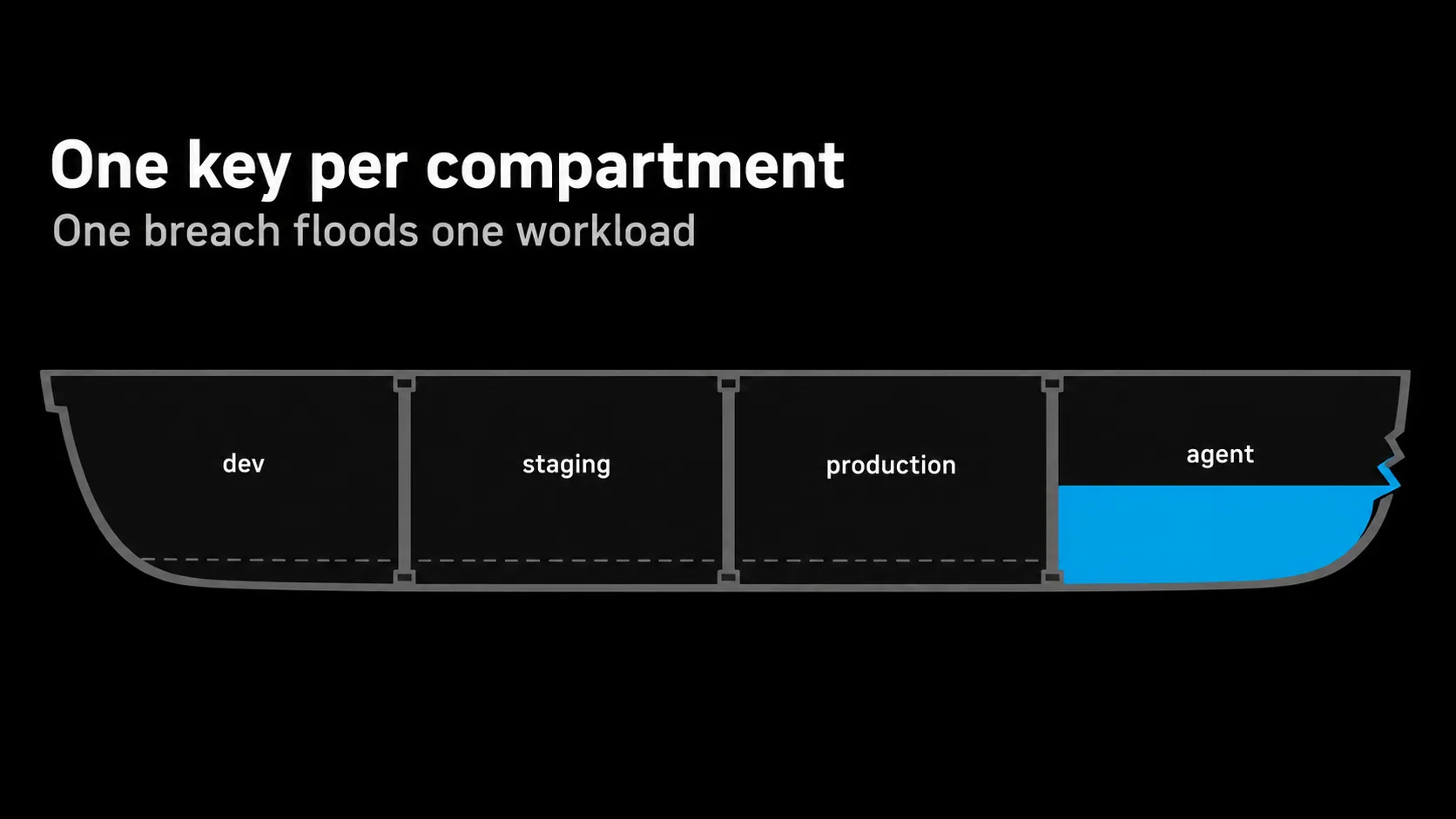
Give every app, every environment and every agent its own key, inside its own OpenAI project or Anthropic workspace. Scoping is what turns a leak from “everything is exposed” into “one workload is exposed,” and it is the only way the provider’s spend limits and usage reports can tell you which key went wrong.
The reason the container matters, not just the key: provider controls attach to the container. OpenAI’s production guide lets you “set custom rate and spend limits per project.” Anthropic’s workspace docs say an API key “can be scoped to a single workspace,” and that every request runs in exactly one workspace and only sees its resources.
What I do in practice:
- One workspace per environment. Dev, staging and production never share a key. A dev laptop is the most likely place for a key to leak, so it should be the least valuable key you own.
- One key per agent. Every always-on agent holds credentials, which makes each one part of your attack surface. I covered that in always-on AI agents. Separate keys mean you can kill one agent without taking the rest down.
- A separate, capped, short-lived key for any hosted tool. Anthropic warns that uploading a key to a third-party tool gives its developer access to your Console account. Give that tool a key you would not mind losing.
- Restrict what the key can do. OpenAI lets you assign permissions to individual keys, so a key that only needs one endpoint should not be able to reach the rest.
Do provider spend limits actually stop a stolen key?
Partly. A hard spend limit stops traffic once tracked spend hits the cap, but it applies to a project or workspace, not a single key, it resets monthly, and enforcement can lag. A spend alert only emails you while the meter keeps running. Set hard limits, sized close to real usage.
The distinction that catches people, straight from OpenAI’s guide: “Set spend alerts on the limits page to send notifications,” while “to enforce a monthly cap, set a hard spend limit.” Two different controls with similar names. Prune’s breakdown puts it bluntly: OpenAI hard limits apply to a project or organization, Anthropic limits to a workspace or organization, both are monthly, and both can overshoot slightly.
Two traps worth knowing:
- Anthropic’s Default Workspace cannot have a spend limit. That comes from Anthropic’s own docs. If your production key lives there, it has no cap below the organization limit. Move it.
- A monthly cap is a slow brake. IBM’s podcast notes attackers “blowing past usage caps in some cases.” A cap sized at ten times your real spend is a cap that lets an attacker spend ten times your real spend.
My call: hard limit per workspace at roughly your expected monthly spend plus headroom you would honestly be willing to lose, with alerts at lower thresholds. If you need a daily cap on one key, put a gateway in front of the provider. I would revisit that if providers ship native per-key daily caps, which they did not have as of this week.
Should you IP-allowlist your AI API keys?
Yes, wherever your servers have stable outbound IPs. An allowlist means a stolen key is useless from the attacker’s machine, which neutralizes the most common leak paths: a pasted key, a scraped repo, a stolen laptop file. It is the single control that makes a valid key worthless in the wrong place.
Availability differs by provider, per the October checklist:
| Control | OpenAI | Anthropic | Google Gemini |
|---|---|---|---|
| Scope container | Project | Workspace | Cloud project |
| Hard spend cap | Per project or org, monthly | Per workspace or org, monthly (not Default Workspace) | Per project in AI Studio, experimental, can lag about 10 minutes |
| Key expiry | Optional expiry, admins can enforce a max lifetime | Chosen at creation, cannot be changed later | Not documented for Gemini keys |
| IP allowlist | Org or project level, other IPs get a 401 | Enterprise plans, via support | Application restrictions in Cloud console |
| Per-key permissions | Yes | Via workspace roles and scoping | Restricted to the Gemini API by default |
The catch is serverless. Many edge and function platforms do not give you a fixed egress IP by default, so an allowlist can break your own app. In that case route model calls through one small server or gateway with a fixed IP and allowlist that. It is one more moving part, and I think it is worth it for any key that can spend real money.
Where should AI API keys live?
On the server, in a secrets manager or the platform’s encrypted environment settings, injected at runtime, and never in client code, a repo, a prompt or an agent’s readable context. If code or an agent can print the key, assume the key will eventually be printed somewhere you did not intend.
A few specifics that bite builders:
- Never prefix a key with
NEXT_PUBLIC_. Next.js bundles those values into client JavaScript. It is the fastest way to publish a key. - Keep keys out of the agent’s view. In the system I use to run headless Claude jobs for my own content work, the root environment file is parsed by the orchestrator and never loaded into the child process, model provider variables are stripped before each run, and a hook blocks a list of commands outright. I built it that way because an agent that can read the environment can also echo it into a log.
- Pin your AI dependencies. The LiteLLM payload hid in Python startup hooks,
.pthandsitecustomize.pyfiles. LiteLLM’s incident post told affected users to pin to 1.106.2 and not to start withpip install, because starting Python in the infected environment re-runs the malware. Unpinned installs of the gateway that holds every key is the worst place to be casual.
There is a systems idea under this. In security it is called least privilege, but I think of it the way a ship designer thinks about bulkheads. You do not stop the hull from ever being breached. You make sure one breach floods one compartment. Every shared key is a missing bulkhead.
How do you rotate AI API keys without downtime?
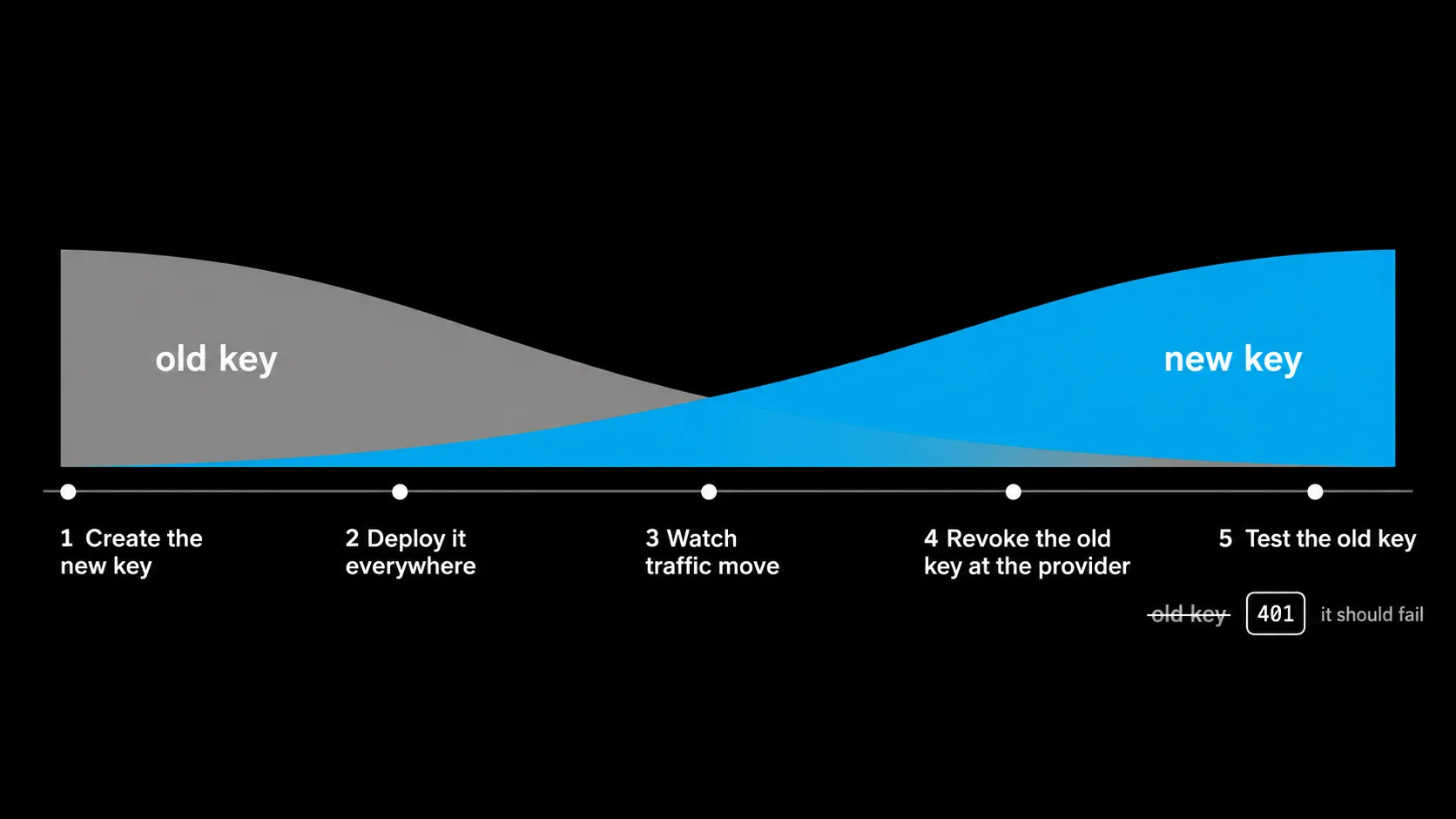
Create the new key, deploy it everywhere the old one is used, confirm traffic on the new key, then revoke the old one at the provider. Set an expiry on every key so rotation happens on a schedule instead of during an incident. OpenAI documents exactly this order.
The OpenAI guide says it “strongly” recommends “setting an expiration date when you create a project API key,” and lets administrators enforce a maximum key lifetime at the organization or project level. On Anthropic, the checklist above reports expiry is picked at creation from options like 1 day, 7 days, 30 days or a custom duration, and cannot be changed later. Pick it deliberately.
The rotation drill:
- Create the replacement key in the same project or workspace, with an expiry.
- Update the secret in your secrets manager or hosting settings.
- Redeploy or restart every service that reads it. Long-running workers keep the old value in memory.
- Watch usage move to the new key.
- Revoke the old key at the provider.
- Test the old key once. It should fail. This is the step the March LiteLLM victims skipped.
Rehearse it once on a quiet day. The first time you rotate should not be the night you find out a key leaked.
What should you monitor in usage logs to catch a stolen key?
Per-key or per-workspace usage against a baseline: models your team never calls, request or token volume above normal, activity during hours your systems are idle, and traffic from unexpected regions. Stolen AI keys almost never cause errors, so cost and usage data is your main detector.
CloudSEK’s leak guide starts exactly there: open the per-key usage view and look for unfamiliar models, volume above baseline and idle-hour activity. This is where scoping pays off. If every agent has its own workspace, a spike points at one agent instead of the whole company.
On Anthropic, the Usage and Cost API reports by workspace, and every response carries an anthropic-workspace-id header, so you can log which workspace each request counted against. If you ran the bad LiteLLM release on AWS, LiteLLM’s post points to GetCallerIdentity calls in CloudTrail from the instance role around install time as a sign the stealer ran.
A practical setup for a small team: a daily job that pulls usage per workspace, compares it to the trailing week, and messages you on anything above two times normal or any model not on your list. It is a few dozen lines of code. The threshold is my own starting point, not a published benchmark, so tune it to your traffic.
What do you do in the first hour after a key leaks?
Revoke first, then repair. Kill the key at the provider, issue a replacement with an expiry, deploy it, then check usage back to the earliest date the key could have leaked, find the source, and talk to billing. Do not wait for proof of abuse before revoking.
- Revoke the key at the provider. Not in the tool. Not in the repo. At the provider.
- Issue and deploy a replacement with an expiry, in the same scoped workspace.
- Lower the spend limit on that workspace for the next few days.
- Pull usage back to the earliest possible leak date, not the date you noticed. For LiteLLM victims that window starts at 11:39 UTC on October 21.
- Rotate everything that sat next to it. The LiteLLM stealer took cloud credentials, SSH keys and CI secrets too, so the provider key is rarely the only thing gone.
- Find and close the source, then contact the provider’s billing support with the timeline.
The pattern under all of this
The standard advice treats AI keys like any other config value: put it in .env, keep it out of git, move on. That made sense when a leaked key mostly leaked data. An AI key leaks money and compute, and in 2026 it can leak the attacker’s next attack, paid for by you.
Black October did not invent a new defense. It exposed how many of us were relying on the old one, deletion and good intentions, against an attacker who only needs the key to still work. I would change my mind on the heavier parts of this runbook, the gateway and the allowlist, if providers ship per-key daily caps and default expiry. Until then, the next step is small: open your provider console today, count your keys, and revoke every one you cannot name a job for.
Frequently asked questions
How do I rotate an OpenAI or Anthropic API key without downtime?
Create the replacement key first, deploy it to every app that uses the old one, confirm traffic is flowing on the new key, then revoke the old key at the provider. OpenAI recommends exactly this order and lets admins enforce a maximum key lifetime so rotation becomes routine.
Can I set a spending limit on a single AI API key?
Not natively. OpenAI hard spend limits apply to a project or organization, and Anthropic spend limits apply to a workspace or organization. Give each app or agent its own project or workspace, or put a gateway in front of the provider if you need a cap per key.
What is LLMjacking?
LLMjacking is the theft and resale of access to large language models using stolen API keys or cloud credentials. The owner of the key pays for the attacker’s usage. Sysdig first documented it in May 2024, and in 2026 stolen keys are being used to fund autonomous hacking tools.
Was I affected by the LiteLLM 1.107.0 compromise?
You were exposed if you installed an unpinned LiteLLM through pip between 11:39 and 13:23 UTC on October 21, 2026, or ran the affected Docker tags until 14:20 UTC. LiteLLM advises pinning 1.106.2, rebuilding environments and rotating every provider key, master key and database password.
How can I tell if my AI API key was stolen?
Check per-key usage in the provider dashboard for models your team never calls, request volume above your normal baseline, activity during idle hours and unexpected regions. A stolen AI key rarely triggers an error. It shows up as ordinary usage on your bill.
Newsletter
New notes, in your inbox.
Get each new article from the workbench by email. No spam, unsubscribe anytime.
Related reading
Continue through the system.
-
Black October Was Not Won by AI. It Was Won by Inventory.
PHP2Shell turned October 2026 into Black October. What AI changed about attacks, why sites went offline, and the defense that actually held.
Read article → -
Token spend reality check: when 1T tokens a month is rational, and when it's theater
AI token spend of a trillion tokens a month can be a bargain or pure productivity theater. What decides it is the denominator, not the bill.
Read article → -
Personal AI agents compared: Claude Duet, Dots, Muse and Grok Bot
Personal AI agents now share one design. Compare Claude Duet, OpenAI Dots, Meta Muse and Grok Bot by approval rules, memory and privacy, not by the model.
Read article →