Claude Docs, Slides, Design and Duet: Which SaaS Tools They Actually Replace
Claude Docs, Slides and Design are now on every plan. Here is which subscriptions they can replace, which ones to keep, and where Duet fits.
When Anthropic put Docs, Slides and Design on every Claude plan, my first instinct was to open my billing page and start cancelling things. I stopped before I touched anything. When I actually listed what each tool does in my week, half of them were not drafting tools at all. They were where my records live, and Claude’s new editors are not built to hold records.
Here is the short answer. Claude can now replace the subscriptions whose whole job is producing a first draft: AI writing assistants, AI deck generators and one-off graphics tools. It cannot replace the systems that hold your records or move your money. Duet, the new agent app, sits on top of those systems. It does not replace them either.
That distinction is the whole post. Everything below is about where the line falls and how to test it on your own stack without breaking something.
What actually changed in Claude this fall?
Between September 16 and October 21, 2026, Claude went from a chat window to a workspace. Docs, Slides and Design now open in their own editor beside the conversation on every plan. Dashboards arrived as a paid beta, a new version of Projects started rolling out, and Duet launched as a proactive agent preview.
The dates matter, because a lot of the coverage blurs them together. According to Anthropic’s release notes, September 16 brought two things: Cowork inside every conversation, and “designs, decks, and docs in any conversation,” available “on every plan, including Free.” Coverage of the October 8 update marks that as the day the three left beta and Dashboards launched. Duet followed on October 21.
| Feature | What it does | Plans | Gets you out as |
|---|---|---|---|
| Claude Docs | Living documents you write with Claude and your team | All, including Free | Word, PDF, Markdown, Google Docs |
| Claude Slides | Decks from notes or reports, presentable inside Claude | All, including Free | PowerPoint, PDF |
| Claude Design | One-pagers, graphics, prototypes on a canvas | All, including Free | PDF, PPTX, HTML, Google Slides, Canva and more |
| Claude Dashboards | Interactive dashboards from plain-English questions | Paid plans, beta | Grafana, Mixpanel and others |
| Projects | Workspaces with their own files, instructions and history | All (Free capped at 5) | Stays in Claude |
| Claude Duet | Proactive agent across your connected apps | US Pro, Max, Ultra by waitlist | Acts inside your existing tools |
Read the last column carefully. Almost everything exports into a tool you probably already pay for. That is the first hint about what this update really replaces.
Which subscriptions can Claude actually replace?
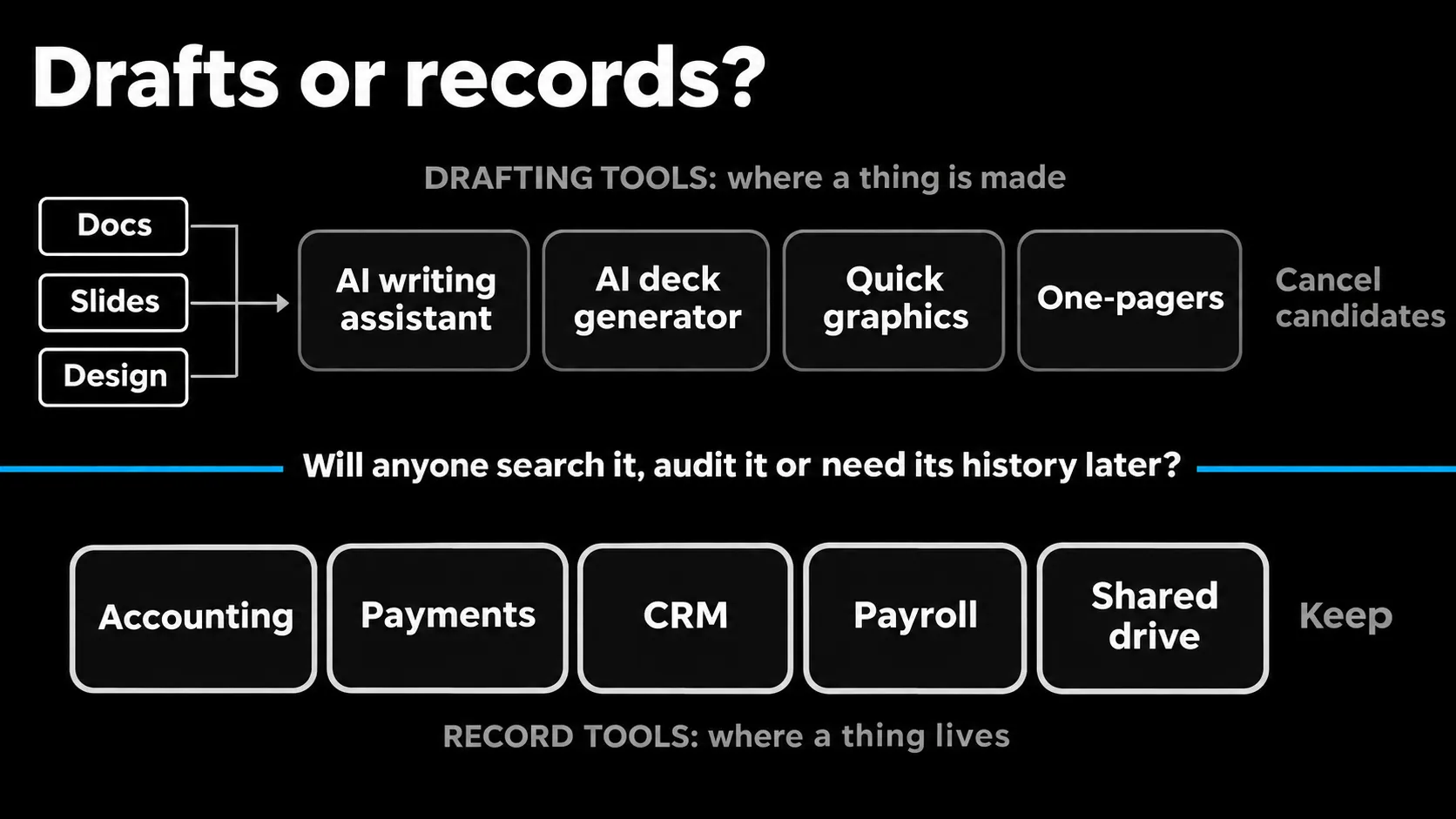
Claude can replace a subscription when that tool’s value was the first draft and nothing else. If you mostly open a tool to generate a doc, a deck or a quick graphic and then move it somewhere else, Claude now does that inside a plan you may already have. If the tool stores records, keep it.
I sort every tool into one of two buckets. A drafting tool is somewhere you make a thing. A record tool is somewhere a thing lives, gets searched later and gets audited. Here is how the categories fall for a small team that does not write code.
| Tool category | Claude piece | My call | Why |
|---|---|---|---|
| AI writing assistant | Docs | Cancel candidate | Docs drafts, comments on its own choices and exports to Word or Google Docs |
| AI deck generator | Slides | Cancel candidate | Exports PowerPoint and PDF, presents inside Claude |
| Quick graphics and one-pagers | Design | Test for two weeks | Strong for one-offs, and it exports to Canva anyway |
| Product or UI design tool | Design | Keep | No version history yet, and multi-person editing is described as basic |
| Team wiki or doc hub | Projects plus Docs | Keep | No trash, no outside sharing on Team plans |
| BI or reporting tool | Dashboards | Keep | Beta, and no published accuracy figures for generated queries |
| Google Workspace or Microsoft 365 | Integrations | Keep | Claude works inside them, it does not replace them |
| Accounting, payments, CRM, payroll | Duet connectors | Keep | Duet needs these to exist |
The cancel candidates are the single-purpose AI wrappers that showed up over the last two years. Their pitch was “a model plus a nice editor.” Claude now ships the editor. That is a hard position for a wrapper to defend, and you should not keep paying for it out of habit.
Why “replace your SaaS stack” is the wrong goal
The popular framing on YouTube right now is that Claude replaces your SaaS stack. I think that is the wrong goal, because the expensive part of most stacks is not the drafting. It is the records, the history and the permissions, and Claude’s new editors are honest about not being built for that yet.
Look at what the help docs actually say. In Claude Docs, only the owner can delete a doc, and “deletion is permanent, with no trash.” Recipients need a Claude account to open a shared doc. On Team and Enterprise, sharing outside the organization is not supported yet. Claude Design has no version history, only snapshots you ask Claude to save. Those are fine properties for a drafting surface. They are disqualifying for the place your client contracts live.
What my own build taught me about drafts and records
I learned this distinction the slow way. I built my own local content platform to kill the copy-paste chain between an ideas sheet, a posting schedule, a stack of Docs and manual posting. The thing I expected to replace was the sheets. The thing I actually replaced was the glue work between them. The sheets stayed, because they were the record. The platform now imports from them and mirrors back to them.
Claude is in the same position. It is excellent glue and a fast drafting surface. Treat it as the place work gets made, and keep the place work gets stored.
Where I would be wrong: if your doc tool was never more than a scratchpad, with no sharing, no history you care about and nobody outside your company reading it, then Docs genuinely replaces it. Make that call per tool, not as a blanket rule.
What are Claude Projects good for if you don’t code?
A Claude Project is a workspace with its own instructions, files and chat history, so every conversation inside it starts with the context you set once. For a non-coder, it replaces the folder of saved prompts and the habit of pasting the same background into every new chat.
The facts, from Anthropic’s Projects documentation: Free users can create up to five projects. Paid plans get retrieval mode, which kicks in when project knowledge nears the context limit and expands capacity by up to 10x. Sharing with view or edit permissions is Team and Enterprise only.
The new version of Projects
There is also a new version in beta, rolling out first to select Claude Code subscribers, with Chat and Cowork to follow. In it, a project becomes a single conversation that splits work into parallel threads running in the cloud, plus a Library that collects your files and everything Claude produces. Running several threads at once uses your plan allowance faster, so watch that.
How I would set up a Project
The way I would set it up: one Project per recurring job, not per topic. My proposals come out of one fixed framework plus a client’s discovery notes. That is exactly the shape a Project holds. The framework goes in the instructions, the templates go in the knowledge, and each new client is a new chat. Do the same for your weekly report, your client onboarding pack or your sales deck.
Is Claude Duet ready to run your admin?
Not as a replacement for anything yet. Claude Duet is a research preview, available by waitlist to US Pro, Max and Ultra subscribers, and Anthropic’s own announcement says it may misread threads or misjudge urgency. It is worth testing on read-and-draft work, with every approval left on.
What Duet does and what it will not do
What it does, per Anthropic’s Duet announcement: it runs on Opus 5.5 in its own virtual machine with a browser, so your laptop can be off. It checks connected apps every few hours, sends a morning brief and messages you only when something needs attention. It connects to tools like Gmail, Slack, QuickBooks, Stripe, HubSpot, Canva and Shopify. It reads and drafts freely but asks before it sends messages, makes payments, signs documents or deletes anything. Some actions, like trading securities and moving money between accounts, are blocked even with approval.
Why approval-before-acting is the right default
I like that default, and I like it for a specific reason. My own content platform publishes scheduled posts through Buffer while my PC is off. The failure case I spent the most design time on was not a bad post. It was an interrupted push, where the system cannot tell whether the post went out. A blind retry risks a double post. So that case lands in a “needs check” state that waits for a human. Duet’s approval-before-acting design is the same instinct applied to your inbox and your money.
The limits to plan around
Two practical limits. Background checks and larger tasks count against your plan’s usage limits, so a heavy Duet week eats into your Claude allowance. And it cannot show you its browser yet, so you are trusting a report of what it did. If you want the wider picture of how Duet stacks up against Meta’s Muse and OpenAI’s Dots, I compared the personal agents in this breakdown, and wrote about the always-on pattern behind them in this post on always-on agents.
How do you test replacing a subscription with Claude?
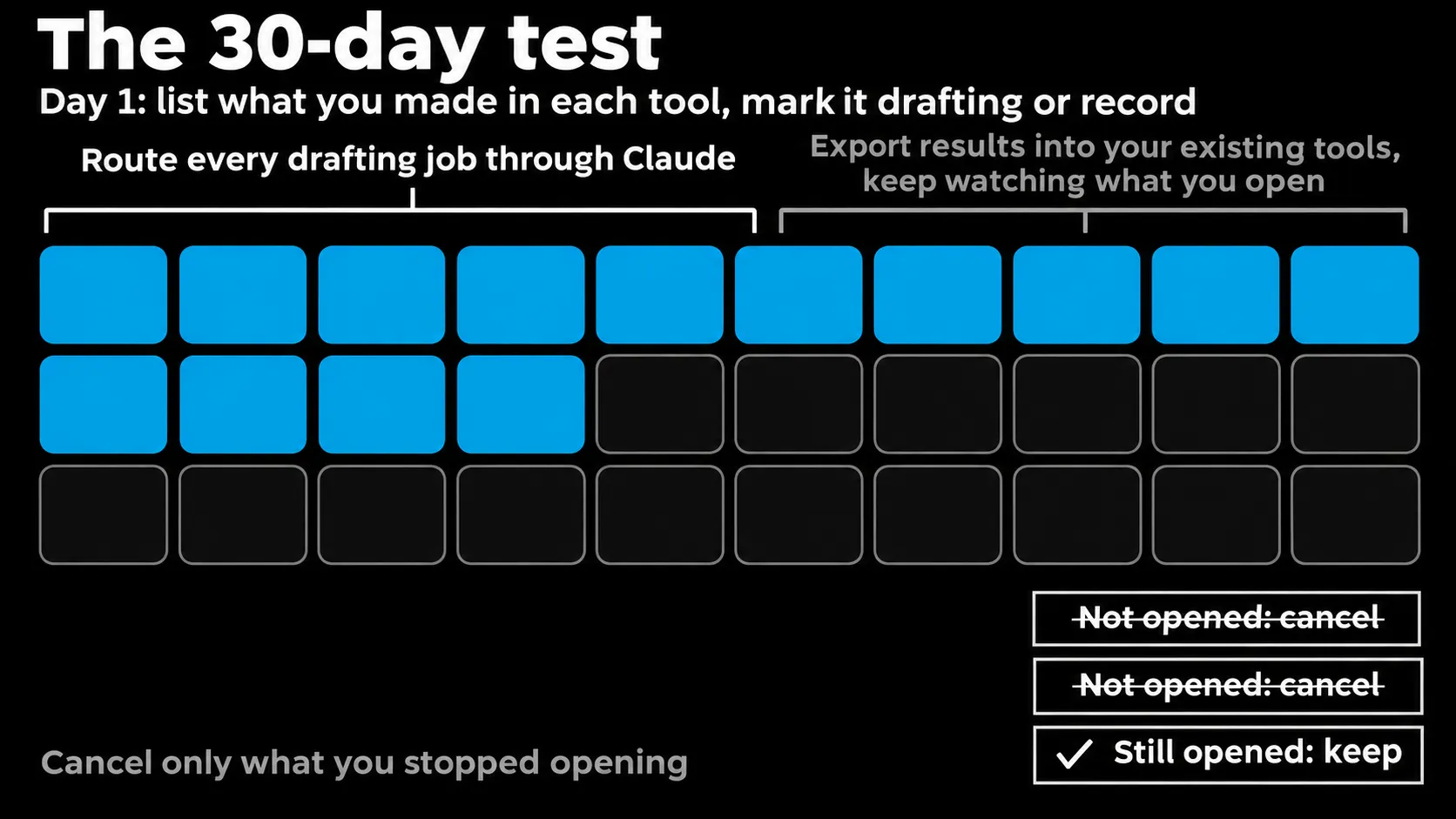
Run a 30-day test instead of cancelling on launch day. List what you actually produce in each tool, route every drafting job through Claude for two weeks, export the results into your existing stack, then cancel only the tools you stopped opening. This keeps your records safe while you find out.
- List the output, not the tool. For each subscription, write down what you made in it last month. “Three sales decks and a proposal” is useful. “Presentation software” is not.
- Mark each one drafting or record. If anyone searches it later, audits it or needs its history, it is a record. Records stay.
- Route drafting jobs through Claude for two weeks. Docs for written work, Slides for decks, Design for one-off graphics. Export each result into the tool where it normally lives.
- Watch your usage. Docs and Design draw from the same shared allowance as the rest of Claude, with no separate Design budget. On Free, you will hit the limit faster than you expect.
- Cancel what you did not open. At the end of the month, any drafting tool you never logged into is a real cancellation. Any you still opened is telling you something Claude did not cover.
- Give Duet read-and-draft jobs only. Morning brief, inbox triage, draft replies. Keep every approval on until it has earned more.
What does it cost to switch to Claude?
Docs, Slides and Design cost nothing extra: they are on every plan, including Free. What you pay for is usage. Pro is $20 a month, Max is $100 and Ultra is $200, per Claude’s pricing page. Dashboards needs a paid plan, and Duet is included in Pro, Max and Ultra during the preview.
| Plan | Monthly price | What matters here |
|---|---|---|
| Free | $0 | Docs, Slides, Design; up to 5 Projects; limited usage |
| Pro | $20 ($17/mo billed annually) | Higher usage, Projects, Dashboards beta, Duet preview in the US |
| Max | $100 | 5x Pro usage, Duet preview |
| Ultra | $200 | 10x Pro usage weekly, no 5-hour limit, Duet preview |
| Team | $25 per standard seat ($20 annually) | Project sharing, admin controls |
I am not going to quote what the tools you might cancel cost, because I do not have verified numbers for your plans and neither does anyone writing a generic list. Pull your own invoices. The math is simple once you know which subscriptions are pure drafting tools.
The tools that disappear are the ones that only made first drafts
Zoom out and the pattern is not really about Claude. Every time a model gets a decent editor, the products whose entire value was “the model plus an editor” lose their reason to exist. The products that hold your data, your history and your permissions get more valuable, because now an agent needs somewhere trustworthy to read from and write to.
So the useful question is not “what can Claude replace?” It is “which of my tools is a record, and which is just a place I make drafts?” Answer that honestly and the cancellations pick themselves.
Your next step: open your billing page, write the drafting-or-record label next to every line, and start the 30-day test on the drafting column only. If you want to see how I connect these pieces into one working setup, start with how I think about an AI operating system for a founder.
Newsletter
New notes, in your inbox.
Get each new article from the workbench by email. No spam, unsubscribe anytime.
Related reading
Continue through the system.
-
Always-on AI agents: what OpenAI Dots actually changes
Always-on AI agents can carry work between conversations. Learn what OpenAI Dots changes, where agent computers help, and how to run a useful pilot.
Read article → -
Claude Opus 5.5: What Creators Are Making
Claude Opus 5.5 is helping creators build games, videos, and interactive projects. Here is what changed, what examples show, and where review matters.
Read article → -
Gemini RSI Leak: What the Evidence Actually Proves
Gemini RSI leak claims are outrunning the evidence. See what Google has confirmed about recursive improvement, RRSI, and AlphaEvolve.
Read article →